
What is Libby / OverDrive?
The Beehive Library Consortium (often referred to as "Libby" or "OverDrive") is a digital library with ebooks, audiobooks, magazines, and other digital content. The consortium is managed by the Utah State Library Division and is made up of 70 member libraries.
Books are checked out using a Brigham City Library card on the Libby app or website. Checkouts are available offline when downloaded in the app. There are no late fines. To view a catalog of titles, visit the OverDrive home page.
Access



A Note About Kindles
If the Libby app is not readily available on your Kindle device, check out the book using a different device (phone, computer, etc.) and use the "Read with Kindle" tool. This will prompt you to log into your Amazon account so that the book can be sent to your Kindle.
For instructions on sending books to Kindle, please view Libby's Help Page.
Request on Libby
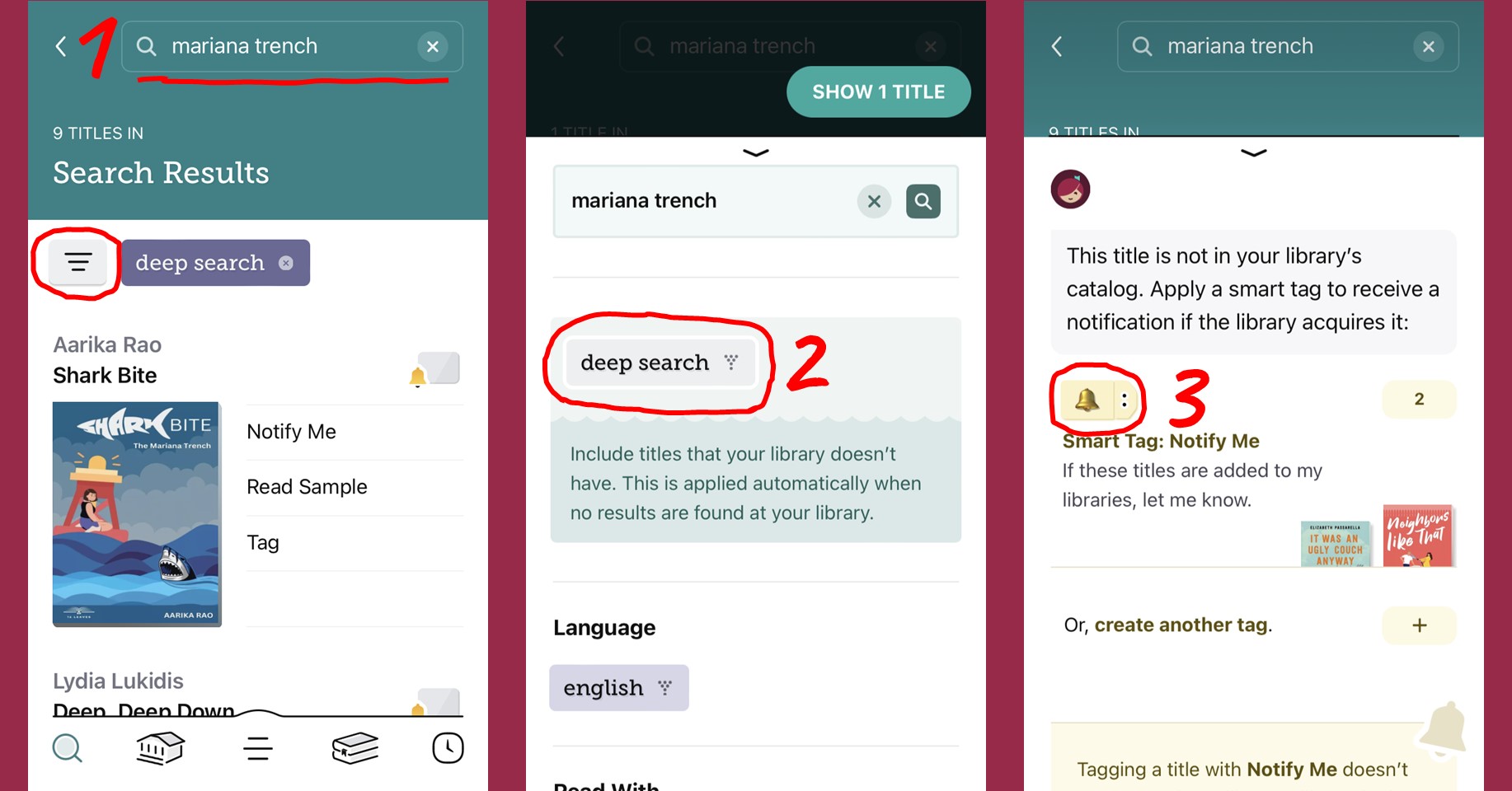
To make a purchase request on Libby, use the "Notify Me" tag to let librarians know you're interested in a particular title. If the library buys the book, you'll be alerted through the app.
1. Search for the book and tap the three-lined menu.
2. Scroll and select "deep search".
3. Tap "notify me" on the book you want, then tap the bell tag.
PIN Help
For help resetting or recovering a PIN, please follow the steps below under "What's my Libby password?" or "Why is Libby not working?"
For further help, please visit the Library during regular hours with your library card and photo ID to have a staff member reset your PIN/password.
How do I get a Libby account?
It comes with your card!
Every library card automatically comes with access to Libby/Overdrive. The password is the same as your library card PIN. If you've forgotten your PIN, visit the library with photo ID to have staff reset it for you.
Or use the "Forgot my PIN" feature under the "My Account" tab on the catalog.
What's my password/PIN?
The PIN written inside your Welcome brochure.
Every new library card comes with a randomly generated PIN. Library staff should have written your PIN on a trifold "Welcome" brochure when you first got your card. If you've forgotten your PIN, you can send a reset link to the email address you provided to the library:
1. Visit our catalog page.
2. Select "My Account" at the top of the page (3-lined menu if using a mobile device).
3. Select "Forgot my PIN"
A reset link will be sent to whatever email address is on file with the library. You can also visit the library with a photo ID to have the staff reset your PIN. Staff do not disclose or reset PINs by phone or email.
Can I apply online?
No
We do not currently offer online library card applications or renewal. To apply for a card or renew an existing card, please visit the library anytime at least 30 minutes before close.
For more info, please visit the cards page of our website.
Can I pay fines online?
No
We do not currently offer an online payment option. You can pay in-person with cash, card, or check. You can also pay over the phone by card (435-723-5850). When paying over the phone, be sure to have your library card number AND your payment information handy.
If your account is at collections, payments must be made to the collection agency. Contact the library for more information.
Why do I pay a Non-Resident fee?
The Library is funded by Brigham City property taxes. Households and individuals who rent or own property in Brigham City are supporting the library through their taxes, and may obtain a library card without additional charge.
Select policies allow other groups to obtain cards at no additional cost:
>> Residents of Weber County
>> Brigham City Corporation employees
>> Students and employees in a Brigham City public school
Individuals who do not rent or own property in Brigham City, and who do not fall under any of the additional policies, may pay a fee for library privileges. This fee covers all individuals in the household.
For more info, please visit the cards page of our website.
How many books can I check out?
It varies
Checkout limits vary depending on your age group and card type. Generally, adults can have up to 25 items and children up to 15. Student cards are limited to 5 items. Digital checkouts are capped at 15, regardless of card type.
Checkouts may also be limited by item type (i.e. 1 tablet per card, etc.)

Library app company.

Library app.
App content.
Library app company.
Library app.
App content.